Equalizing earphones with AutoEq and a Qudelix-5K
Now that the IEC711 clone coupler lets me measure earphone frequency response, the next step is equalization.
I’ll use the Harman in-ear 2019 target curve as the reference. Rather than chasing the EQ by hand while listening, I hand the measurement and the target to AutoEq and let it optimize. The parameters that come out go into a Qudelix-5K USB DAC, and then I measure the corrected response on the coupler again. Whether the EQ is doing what it’s supposed to gets checked by measurement, not by ear.
Connections
The Qudelix-5K is what does the equalizing, so the earphone goes into its headphone output. The coupler’s microphone goes into the UA-1EX’s plug-in power input.
Under Preferences > Soundcard in REW, set the Qudelix-5K as the output device and the UA-1EX as the input device.
%%{init: {
  "theme": "base",
  "themeVariables": {
    "primaryColor": "#ffffff",
    "primaryBorderColor": "#444",
    "lineColor": "#666",
    "clusterBkg": "#fafafa",
    "clusterBorder": "#bbb",
    "nodePadding": 50
  }
}}%%

flowchart LR

PC("fa:fa-computer PC / REW")
DAC("Qudelix-5K")
IF("Roland UA-1EX")
EARPHONE("fas:fa-headphones Earphone")
COUPLER("IEC711 Coupler")

PC <--USB--> DAC
DAC --headphone out--> EARPHONE
EARPHONE -.acoustic.-> COUPLER
COUPLER --plug-in power--> IF
IF <--USB--> PC

style DAC stroke-width:3px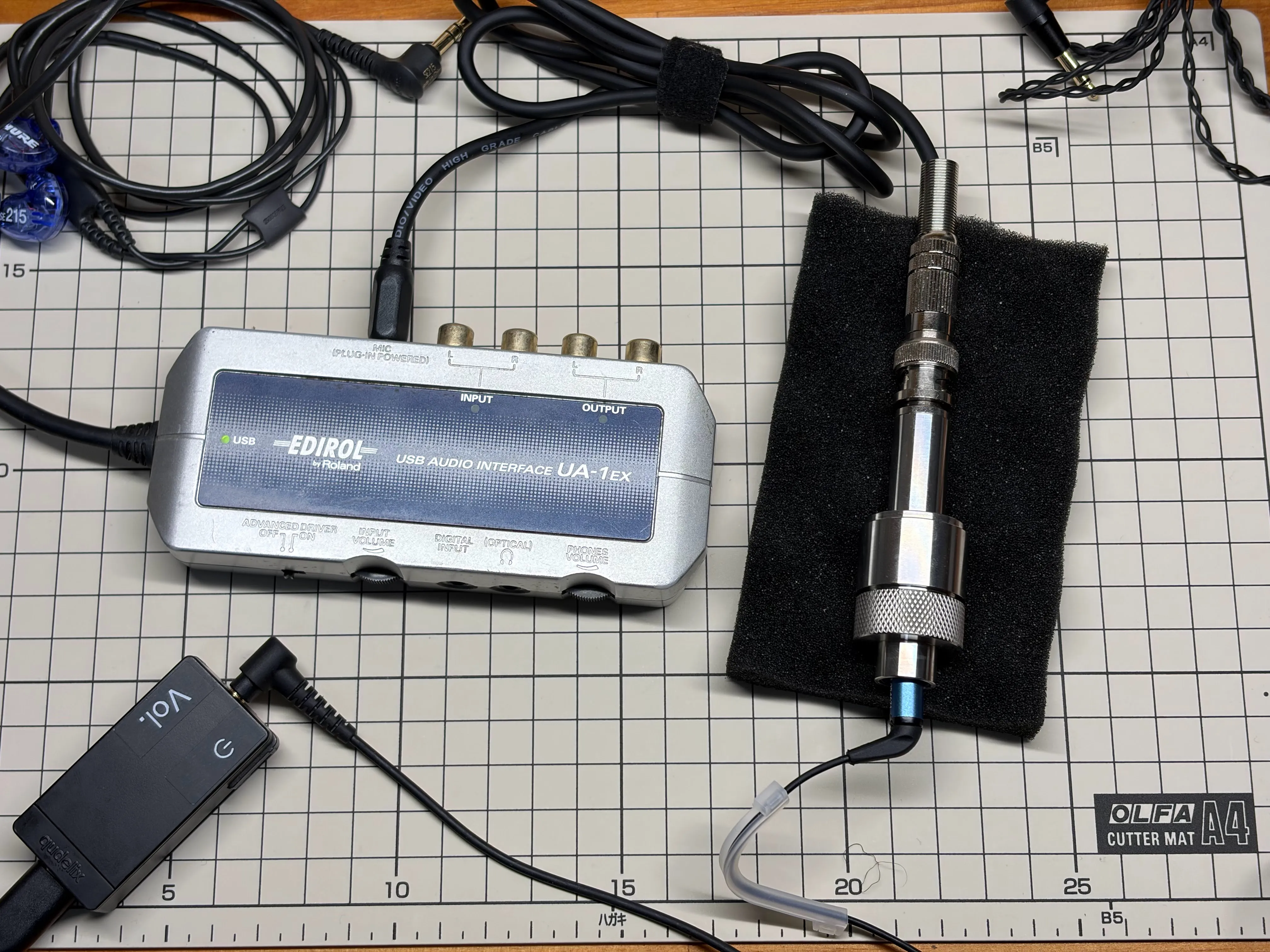
Generating PEQ parameters with AutoEq
AutoEq is a wonderful thing to have if you want to equalize your earphones or headphones. On top of computing the parameters from a frequency response and a target curve, it also hosts measurements for a wide range of models along with pre-computed presets.
Thanks again to jaakkopasanen, the author.
AutoEq isn’t a player and doesn’t do the equalization itself. The parameters it produces go into some other app or device. Here that role belongs to the Qudelix-5K, a DAC.
AutoEq comes as a web app and a GitHub repository.
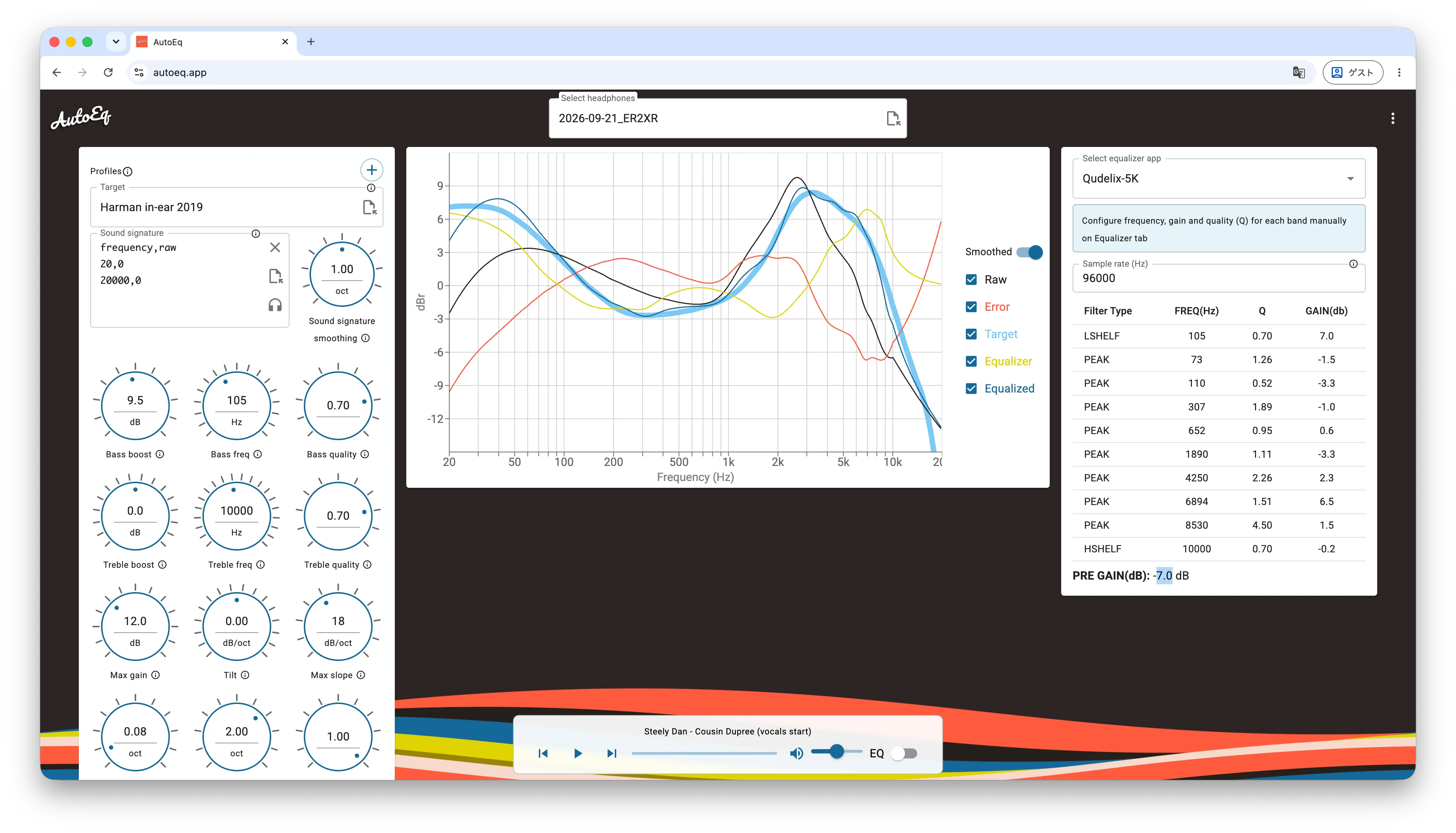
The web app can generate settings for the Qudelix-5K but can’t export them to a file, so I used the scripts published on GitHub instead.
Setup
The Python environment goes in a venv.
python3 -m venv .venv
.venv/bin/pip install numpy scipy matplotlib pillow pyyaml tabulate soundfile tqdm
.venv/bin/pip install --no-deps --ignore-requires-python \
    "autoeq @ git+https://github.com/jaakkopasanen/AutoEq@master"
What I need from the repository is the target curves in targets/. The repository itself is huge — about 4.4 GB — so I do a partial clone. I pull autoeq/ along with it, but that’s for reading the settings and default values in the source.
git clone --filter=blob:none --depth 1 --sparse \
    https://github.com/jaakkopasanen/AutoEq.git vendor/AutoEq
git -C vendor/AutoEq sparse-checkout set targets autoeq
Exporting the measurement
The data I hand to AutoEq gets exported from REW. Combine the L/R average with Trace arithmetic, then write it out with File > Export > Export measurement as text.
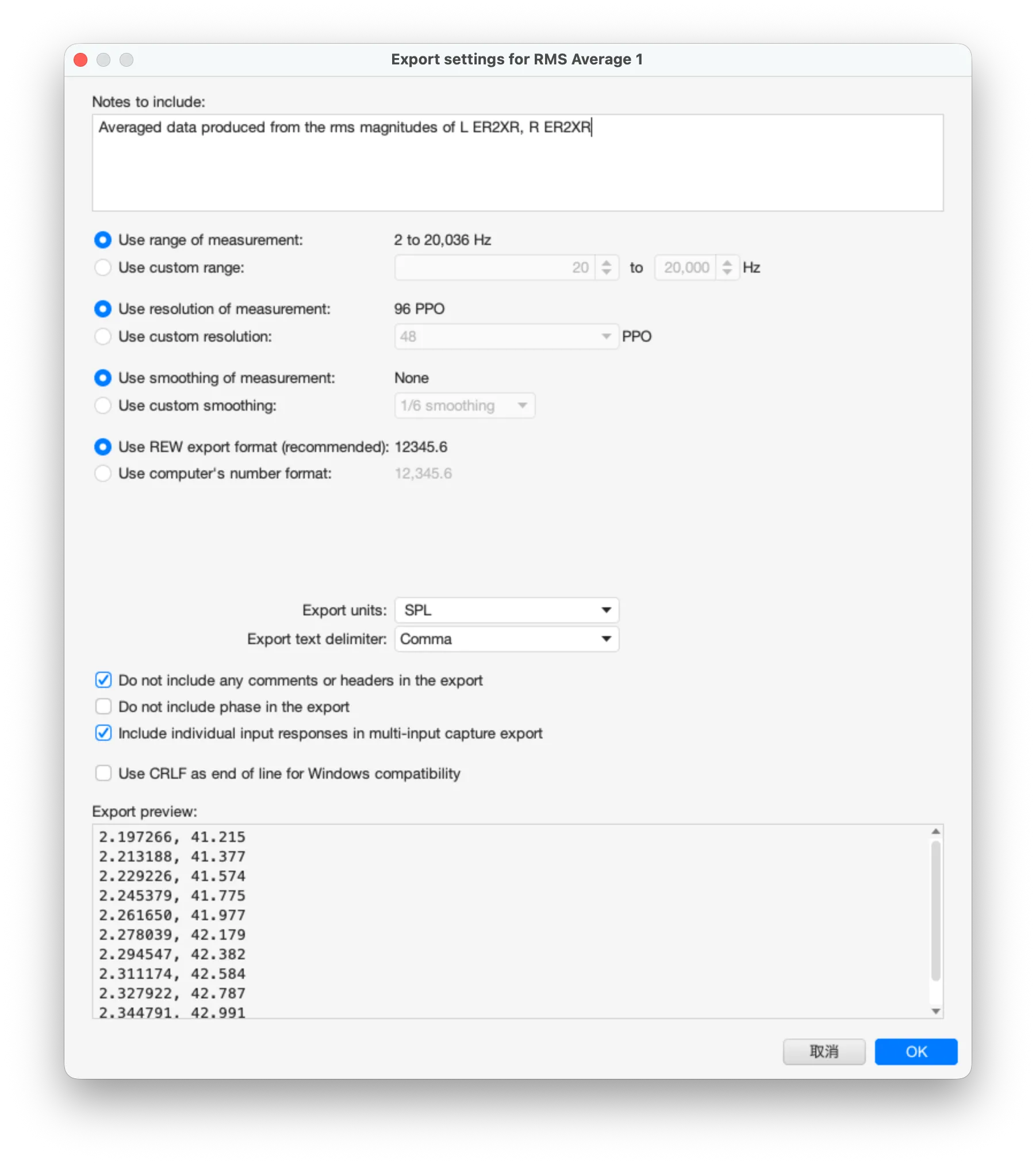
- Use commas as the separator. With space-separated values AutoEq’s parser dies with
CsvParseError: Could not find column and decimal separators. - Use the
.csvextension. The CLI builds the output filenames with.replace('.csv', ...), so if you hand it a.txt, the ParametricEQ, the GraphicEQ, the csv and the png all get written over each other in one file. - Export without smoothing. The smoothing is AutoEq’s job.
Generating the parameters
Run it from the CLI.
.venv/bin/python -m autoeq \
    --input-file "measurements/2026-09-21_ER2XR.csv" \
    --output-dir "results" \
    --target "vendor/AutoEq/targets/Harman in-ear 2019.csv" \
    --parametric-eq --parametric-eq-config QUDELIX_5K \
    --max-gain 12.0 --fs 96000

100%|████████████████████████████████████████████| 1/1 [00:00<00:00,  1.08it/s]
--target "..."Path to the target curve.--parametric-eqOptimizes the PEQ and writes<model> ParametricEQ.txt.--parametric-eq-config QUDELIX_5KGives the same setup you get by picking Select Equalizer app > Qudelix-5K in the web app. Ten bands — LSC 105 Hz + PK×8 + HSC 10 kHz — with gain within ±12 dB and the PKs at Q 0.1–7 / Fc 20 Hz–10 kHz. Leave it out and you get the default4_PEAKING_WITH_LOW_SHELF,4_PEAKING_WITH_HIGH_SHELF, so it has to be spelled out.--max-gain 12.0Matches MAX GAIN to the web app’s default of 12.0 rather than the CLI’s default of 6.0.--fs 96000Sampling frequency. The default is 44100, but I moved it closer to the rate the hardware runs its filters at.
One more difference: the web app cuts the optimization off at 0.5 seconds on the server, while the CLI doesn’t. It may converge better than the web app even with the same band layout.
The correction is limited to the High Shelf at 10 kHz. Above that, coupler resonance and fit dominate, so there probably isn’t much point.
Applying it to the Qudelix-5K
The <model> ParametricEQ.txt that comes out is in Equalizer APO format, which the Chrome Qudelix extension reads as-is.
The rounding is done on the AutoEq side too. The hardware holds integer Fc / 0.1 dB gain / 0.01 Q, and the QUDELIX_5K config keeps Q within 0.1–7 and gain within ±12 dB, so the output is written at that resolution.
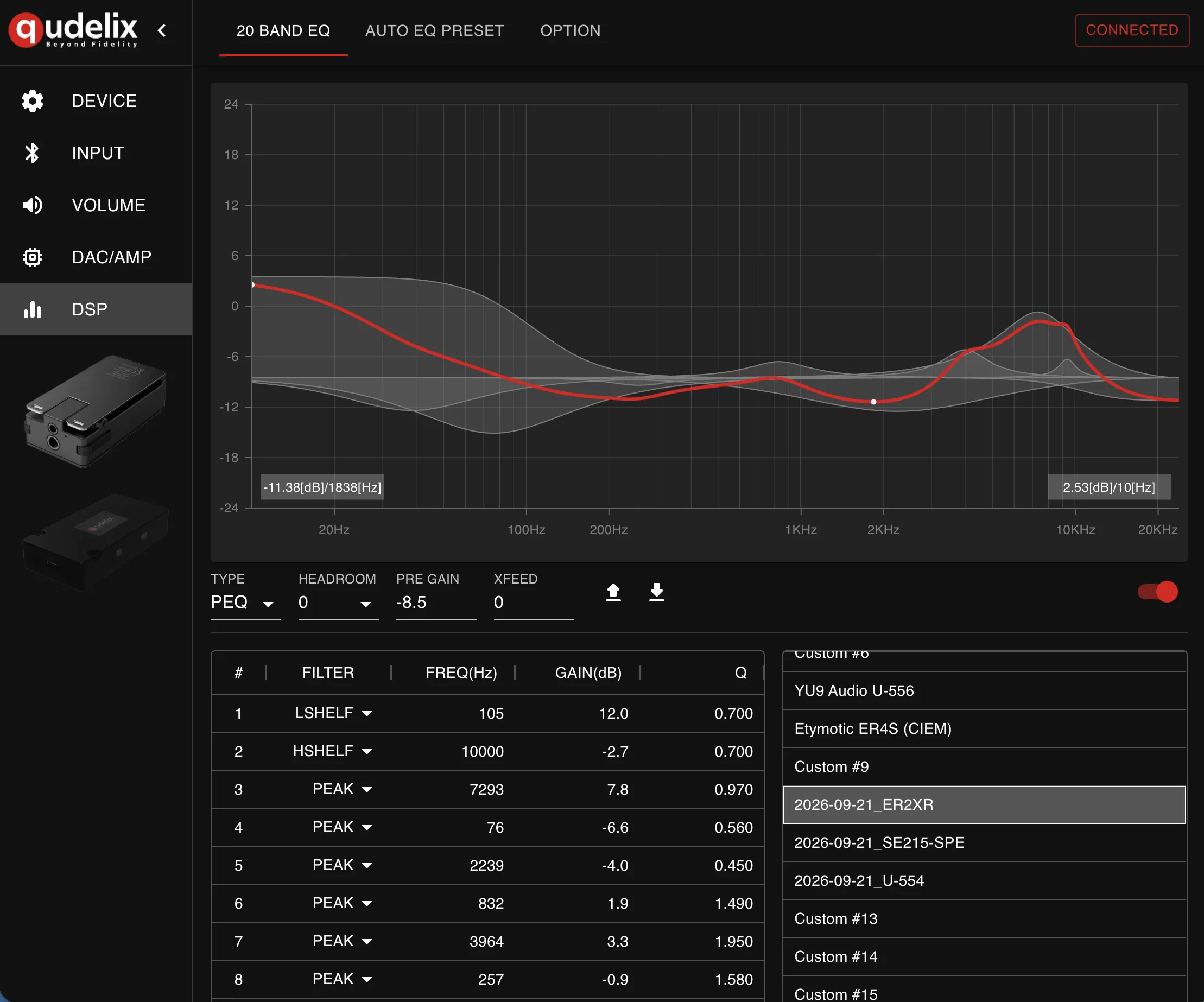
Incidentally, the parameters you can pick from AUTO EQ PRESET appear to be the ones in results/ in the GitHub repository, which would make them computed with the CLI’s default max gain of 6.0.
Measuring after EQ
With the generated PEQ applied, I measured on the coupler again.
Smoothing is 1/6 octave. The dashed line is the Harman in-ear 2019 target, the solid lines are the left and right after correction. I didn’t do an SPL calibration, so ignore the absolute values on the vertical axis and look at the shape of the curve. Above 8 kHz the coupler’s own behaviour comes into it, so I’m not going to worry about that range.
ETYMOTIC ER2XR
Preamp: -8.5 dB
Filter 1: ON LSC Fc 105 Hz Gain 12.0 dB Q 0.70
Filter 2: ON HSC Fc 10000 Hz Gain -2.7 dB Q 0.70
Filter 3: ON PK Fc 7293 Hz Gain 7.8 dB Q 0.97
Filter 4: ON PK Fc 76 Hz Gain -6.6 dB Q 0.56
Filter 5: ON PK Fc 2239 Hz Gain -4.0 dB Q 0.45
Filter 6: ON PK Fc 832 Hz Gain 1.9 dB Q 1.49
Filter 7: ON PK Fc 3964 Hz Gain 3.3 dB Q 1.95
Filter 8: ON PK Fc 257 Hz Gain -0.9 dB Q 1.58
Filter 9: ON PK Fc 38 Hz Gain -3.9 dB Q 0.67
Filter 10: ON PK Fc 9332 Hz Gain 2.2 dB Q 4.27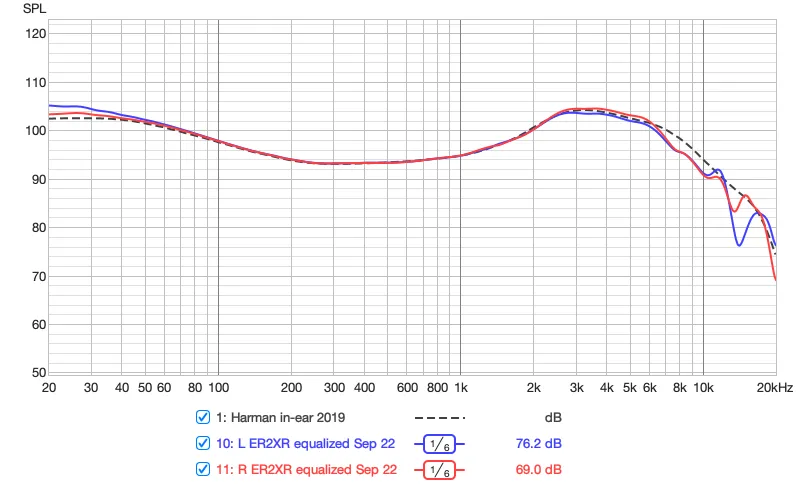
From 20 Hz to 8 kHz it lands almost exactly on the target. The bass that was short and the roll-off above 2.7 kHz are both filled in. The LSC 105 Hz doing the lifting is at +12.0 dB, right on the ceiling I set with --max-gain.
The channel difference is small. Below 50 Hz the left side runs 1 to 2 dB high, which I take to be variation in how it sits.
YU9 U-554
Preamp: -12.8 dB
Filter 1: ON LSC Fc 105 Hz Gain 9.8 dB Q 0.70
Filter 2: ON HSC Fc 10000 Hz Gain -5.9 dB Q 0.70
Filter 3: ON PK Fc 1562 Hz Gain -3.0 dB Q 0.95
Filter 4: ON PK Fc 7191 Hz Gain 5.1 dB Q 1.39
Filter 5: ON PK Fc 22 Hz Gain 2.4 dB Q 6.01
Filter 6: ON PK Fc 32 Hz Gain 2.7 dB Q 2.05
Filter 7: ON PK Fc 82 Hz Gain -1.6 dB Q 1.26
Filter 8: ON PK Fc 799 Hz Gain 1.2 dB Q 1.76
Filter 9: ON PK Fc 280 Hz Gain -0.6 dB Q 1.29
Filter 10: ON PK Fc 2582 Hz Gain -1.1 dB Q 2.51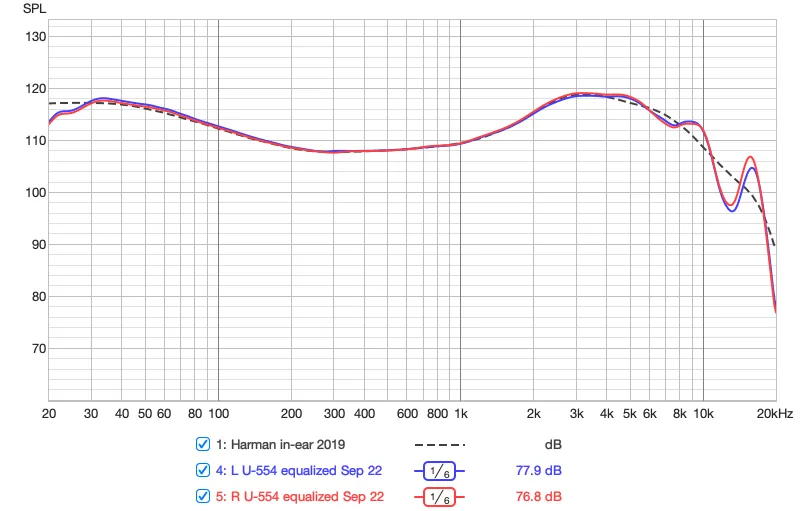
From 20 Hz to 8 kHz it matches the target almost exactly. The bass that rolled off hard, as you’d expect from a BA, is properly lifted by the LSC 105 Hz +9.8 dB and the PKs below it. There’s hardly any channel difference either.
SHURE SE215 Special Edition
Preamp: -8.9 dB
Filter 1: ON LSC Fc 105 Hz Gain 12.0 dB Q 0.70
Filter 2: ON HSC Fc 10000 Hz Gain 9.3 dB Q 0.70
Filter 3: ON PK Fc 89 Hz Gain -8.4 dB Q 0.31
Filter 4: ON PK Fc 3405 Hz Gain 5.8 dB Q 1.86
Filter 5: ON PK Fc 7052 Hz Gain 3.2 dB Q 5.95
Filter 6: ON PK Fc 742 Hz Gain 1.9 dB Q 1.56
Filter 7: ON PK Fc 4859 Hz Gain -5.0 dB Q 5.78
Filter 8: ON PK Fc 2167 Hz Gain -2.2 dB Q 1.97
Filter 9: ON PK Fc 6430 Hz Gain 3.9 dB Q 3.73
Filter 10: ON PK Fc 54 Hz Gain -3.5 dB Q 0.72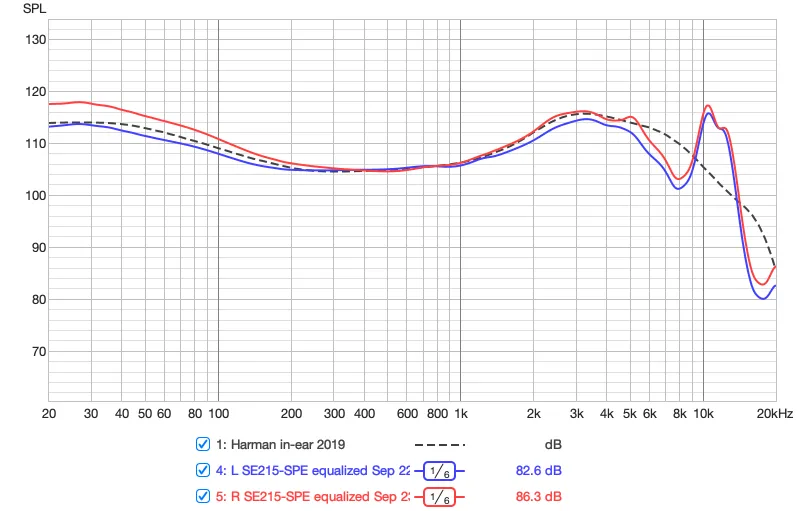
From 200 Hz to around 5 kHz it broadly lands. The 100 Hz to 300 Hz region that came out high last time is held down by the PK 89 Hz −8.4 dB.
The channel difference in the bass is large. From 20 Hz to around 700 Hz the right side stayed 2 to 4 dB above the left. The deep dip at 8 kHz didn’t get filled either.
Summary
- The ER2XR and the U-554 both land almost exactly on the target from 20 Hz to 8 kHz. Being able to confirm that the EQ is doing what it’s supposed to by measurement, rather than by impression, is the good part.
- What doesn’t get filled is deep dips and anything above 10 kHz. Dips especially: the acoustic cause behind them doesn’t go away, so adding gain doesn’t bring the shape back. AutoEq doesn’t force them either.
- Channel differences don’t get fixed by EQ.
- Leaving it to AutoEq is faster and more repeatable than equalizing by feel. Swap in a different measurement and the same steps run again.